I work mostly out of my web browser, Chrome, which for my workflow means I have lots and lots of tabs open, and multiple profiles. I’m sure many of you have a similar setup.
Well, today I wound up with a couple of tabs that I wanted to return to later, because I had some work to do on them– like edit a Jira issue or something, and I wanted an easy way to remember to come back to them.
I dragged them out of my main window, shrank them a bit, and kind of *stuffed* them into a corner of my screen for later.
This was fine, sort of, but I do a lot of window switching from my work profile to my personal profile, and if you separate the windows out like that you wind up with a “Window” menu with multiple entries– and dang if I could ever remember which item went to which window.
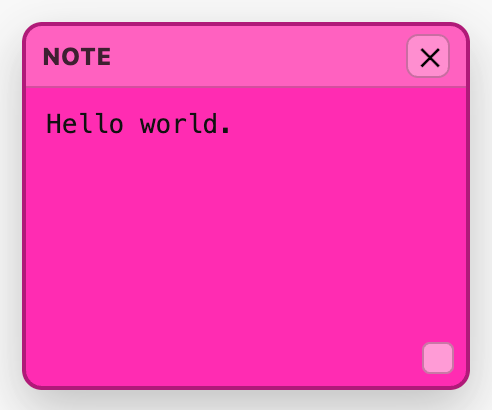
So. I made a bookmarklet that just puts a pink sticky note on the page. It does nothing else, though that’s kind of enough eh? A resizable pink sticky that you can type into and move around as much as you want. And you can add multiple stickies to a page.
The sticky’s contents and location are saved to Chrome’s local storage. That means if you put a sticky on a page and then close the tab, if you go to that page again and click the bookmarklet, your old sticky will appear.
That’s as far as it can go with a bookmarklet– to have the sticky remembered and auto-loaded would take an extension and I’m positive there are a thousand of those already.
Anyway, if you want to use it…
To install the bookmarklet:
- Easiest method:
- Drag this link to your bookmarks bar in Chrome.
- Rename the bookmark something cool.
- Alternate method:
- Copy the code below.
- Right-click your bookmark bar and choose Add Page…
- Give it a name like “stky”
- Paste the code in the URL field.
- Click Save.
Here are the instructions for using it:
- Click the bookmarklet to add a sticky note to the page, click it again to add another one.
- Click the x to delete the sticky
- Drag the bottom right corner to resize it
- If you close and come back to a page, click the bookmarklet to see your old stickies.
- You can export a sticky as a .txt file by clicking the 💾 button.
NOTE: You may encounter some pages that are so hardcore about getting your cursor’s focus that the sticky doesn’t work. In that case, sorry, just delete your sticky and grab a pen and paper.
NOTE NOTE: The bookmarklet works in Safari and Firefox, but has a different minor cosmetic flaw in each of those browsers. I don’t use them, so if that bothers you, the code is below so fix it yourself. 🙂
Bookmarklet Code:
javascript:(()=>{const P="___pinkStickyNote";const STYLE_ID="__pinkStickyStyleLS";const LAYER_ID="___pinkStickyLayerLS";const KEY=(()=>{try{return"__pinkStickies::"+location.origin+location.pathname+location.search;}catch(e){return"__pinkStickies::fallback";}})();const CSS=`#${LAYER_ID}{position:fixed;inset:0;z-index:2147483647;pointer-events:none;} .${P}{position:absolute;width:220px;height:180px;background:#ff2db2;color:#111;border:2px solid rgba(0,0,0,.35);border-radius:10px;box-shadow:0 10px 25px rgba(0,0,0,.25);overflow:hidden;display:flex;flex-direction:column;font-family:-apple-system,BlinkMacSystemFont,Segoe UI,Roboto,Helvetica,Arial,sans-serif;pointer-events:auto;} .${P}__header{flex:0 0 30px;display:flex;align-items:center;justify-content:space-between;padding:0 8px;background:rgba(255,255,255,.18);border-bottom:1px solid rgba(0,0,0,.2);cursor:move;user-select:none;} .${P}__title{font-size:12px;font-weight:800;letter-spacing:.2px;opacity:.85;} .${P}__close{width:22px;height:22px;line-height:20px;border-radius:6px;border:1px solid rgba(0,0,0,.25);background:rgba(255,255,255,.25);cursor:pointer;font-weight:900;} .${P}__close:hover{background:rgba(255,255,255,.4);} .${P}__body{flex:1;padding:8px;} .${P}__text{width:100%;height:100%;resize:none;border:none;outline:none;background:transparent;color:#111;font-size:13px;line-height:1.25;} .${P}__resize{position:absolute;right:6px;bottom:6px;width:14px;height:14px;cursor:nwse-resize;background:rgba(255,255,255,.45);border:1px solid rgba(0,0,0,.25);border-radius:4px;}`;const clamp=(v,min,max)=>Math.max(min,Math.min(max,v));const ensure=()=>{let s=document.getElementById(STYLE_ID);if(!s){s=document.createElement("style");s.id=STYLE_ID;s.textContent=CSS;document.documentElement.appendChild(s);}let layer=document.getElementById(LAYER_ID);if(!layer){layer=document.createElement("div");layer.id=LAYER_ID;document.documentElement.appendChild(layer);}return layer;};const safeParse=(txt)=>{try{const v=JSON.parse(txt);return Array.isArray(v)?v:[];}catch(e){return[];}};const loadAll=()=>{try{return safeParse(localStorage.getItem(KEY)||"[]");}catch(e){return[];}};const saveAll=(arr)=>{try{localStorage.setItem(KEY,JSON.stringify(arr));}catch(e){/* ignore quota/csp */}};const forceFocus=(el)=>{const f=()=>{try{el.focus({preventScroll:true});}catch(_){try{el.focus();}catch(__){}}};f();setTimeout(()=>{if(document.activeElement!==el)f();},0);setTimeout(()=>{if(document.activeElement!==el)f();},25);setTimeout(()=>{if(document.activeElement!==el)f();},80);};const getAllLive=()=>Array.from(document.querySelectorAll("."+P)).map(note=>{const id=note.getAttribute("data-id")||"";const x=parseInt(note.style.left,10)||0;const y=parseInt(note.style.top,10)||0;const w=parseInt(note.style.width,10)||note.offsetWidth||220;const h=parseInt(note.style.height,10)||note.offsetHeight||180;const ta=note.querySelector("textarea");const text=ta?ta.value:"";return{id,x,y,w,h,text};}).filter(o=>o.id);const upsertSave=()=>{saveAll(getAllLive());};const buildNote=(data)=>{const layer=ensure();const note=document.createElement("div");note.className=P;note.style.zIndex="2147483647";note.setAttribute("data-id",data.id);note.style.left=(data.x||0)+"px";note.style.top=(data.y||0)+"px";note.style.width=(data.w||220)+"px";note.style.height=(data.h||180)+"px";const header=document.createElement("div");header.className=P+"__header";const title=document.createElement("div");title.className=P+"__title";title.textContent="NOTE";const close=document.createElement("button");close.className=P+"__close";close.type="button";close.title="Close";close.textContent="✕";header.appendChild(title);header.appendChild(close);const body=document.createElement("div");body.className=P+"__body";const ta=document.createElement("textarea");ta.className=P+"__text";ta.placeholder="Type...";ta.spellcheck=true;ta.value=data.text||"";body.appendChild(ta);const resizer=document.createElement("div");resizer.className=P+"__resize";resizer.title="Resize";note.appendChild(header);note.appendChild(body);note.appendChild(resizer);layer.appendChild(note);let drag=null,resize=null;const onMove=(e)=>{if(drag){const dx=e.clientX-drag.sx,dy=e.clientY-drag.sy;const nx=drag.ox+dx,ny=drag.oy+dy;note.style.left=`${clamp(nx,0,window.innerWidth-30)}px`;note.style.top=`${clamp(ny,0,window.innerHeight-30)}px`;}else if(resize){const dx=e.clientX-resize.sx,dy=e.clientY-resize.sy;note.style.width=`${clamp(resize.ow+dx,140,900)}px`;note.style.height=`${clamp(resize.oh+dy,90,900)}px`;}};const onUp=()=>{drag=null;resize=null;document.removeEventListener("mousemove",onMove,true);document.removeEventListener("mouseup",onUp,true);upsertSave();};header.addEventListener("mousedown",(e)=>{if(e.button!==0)return;e.preventDefault();note.style.zIndex="2147483647";drag={sx:e.clientX,sy:e.clientY,ox:parseInt(note.style.left,10)||0,oy:parseInt(note.style.top,10)||0};document.addEventListener("mousemove",onMove,true);document.addEventListener("mouseup",onUp,true);},{capture:true});resizer.addEventListener("mousedown",(e)=>{if(e.button!==0)return;e.preventDefault();e.stopPropagation();note.style.zIndex="2147483647";resize={sx:e.clientX,sy:e.clientY,ow:note.offsetWidth,oh:note.offsetHeight};document.addEventListener("mousemove",onMove,true);document.addEventListener("mouseup",onUp,true);},{capture:true});close.addEventListener("click",(e)=>{e.stopPropagation();note.remove();upsertSave();},{capture:true});let tmr=null;const scheduleSave=()=>{if(tmr)clearTimeout(tmr);tmr=setTimeout(()=>upsertSave(),250);};ta.addEventListener("input",scheduleSave,{capture:true});ta.addEventListener("blur",upsertSave,{capture:true});ta.addEventListener("pointerdown",(e)=>{e.stopPropagation();forceFocus(ta);},{capture:true});ta.addEventListener("focus",()=>forceFocus(ta),{capture:true});return{note,ta};};const already=new Set(Array.from(document.querySelectorAll("."+P)).map(n=>n.getAttribute("data-id")).filter(Boolean));const saved=loadAll();for(const s of saved){if(s&&s.id&&!already.has(s.id))buildNote(s);}const id=String(Date.now())+"-"+Math.random().toString(16).slice(2);const w=220,h=180;const x=clamp(Math.round((window.innerWidth-w)/2),0,window.innerWidth-w);const y=clamp(Math.round((window.innerHeight-h)/2),0,window.innerHeight-h);const created=buildNote({id,x,y,w,h,text:""});upsertSave();setTimeout(()=>forceFocus(created.ta),0);})();